- Page d'accueil /
- Produits de bureau /
- Électronique de bureau /
- Printers & Accessories /
- Computer Printers /
- Canon PIXMA TS4320 Wireless Color Inkjet Prin...
0 ratings





Numéro d'article:
220489140
Canon PIXMA TS4320 Wireless Color Inkjet Printer for Duplex Printing, White Home Printer with Copier/Scanner, Compact Design, Easy Setup,
Numéro d'article:
220489140
MGA 415560
Price Details
Excluding Shipping & Custom charges ( Shipping and custom charges will be calculated on checkout )
*All items will import from États-Unis
34%
En stock
 Importé depuis la boutique USA
QTY:
Commandez maintenant et recevez votre commande aux alentours du Vendredi, Juin 26
Transaction sécurisée
Ubuy s'engage à protéger votre sécurité et votre confidentialité. Notre système avancé de sécurité des paiements garantit la confidentialité en chiffrant vos informations lors de la transmission grâce aux protocoles AES (Advanced Encryption Standards) et SSL (Secure Socket Layer). Vos coordonnées de paiement sont 100 % sécurisées car nous ne partageons pas vos informations de paiement avec des vendeurs tiers.
nos meilleurs partenaires logistiques


Deliver high-quality printing and outstanding wireless connectivity in a compact size.

Livraison
rapide

Retour
gratuit*

Emballage sécurisé

Produits 100 % originaux

Conformité PCI DSS

Certifié ISO 27001


Ce qui se démarque
Wireless Connectivity
The Canon PIXMA TS4320 offers seamless wireless printing, enabling users to print from multiple devices without the hassle of cables, promoting convenience and flexibility for home or office use.
Compact Design
With its sleek and space-saving design, this printer fits effortlessly in small areas, making it ideal for home environments where desk space is at a premium.
Duplex Printing
The automatic duplex printing feature saves time and paper, providing eco-friendly efficiency while allowing users to print on both sides without manual intervention.
Détails du produit
- Affordable Versatility - A budget-friendly all-in-one printer perfect for both home users and hybrid workers, offering exceptional value
- Crisp, Vibrant Prints - Experience impressive print quality for both documents and photos, thanks to its 2-cartridge hybrid ink system that delivers sharp text and vivid colors
- Effortless Setup & Use - Get started quickly with easy setup for your smartphone or computer, so you can print, scan, and copy without delay
- Reliable Wireless Connectivity - Enjoy stable and consistent connections with dual-band Wi-Fi (2.4GHz or 5GHz), ensuring smooth printing from anywhere in your home or office
- Scan & Copy Handling - Utilize the device’s integrated scanner for efficient scanning and copying operations
- Save Time & Paper - Optimize your printing with automatic 2-sided printing, reducing paper consumption and speeding up your workflow
- Diverse Media Support - Print a wide range of documents and photos up to 8.5” x 11”, with or without borders, for all your creative and professional needs
- Compact & Stylish - Designed to fit seamlessly into any workspace, its small footprint complements your environment without sacrificing functionality
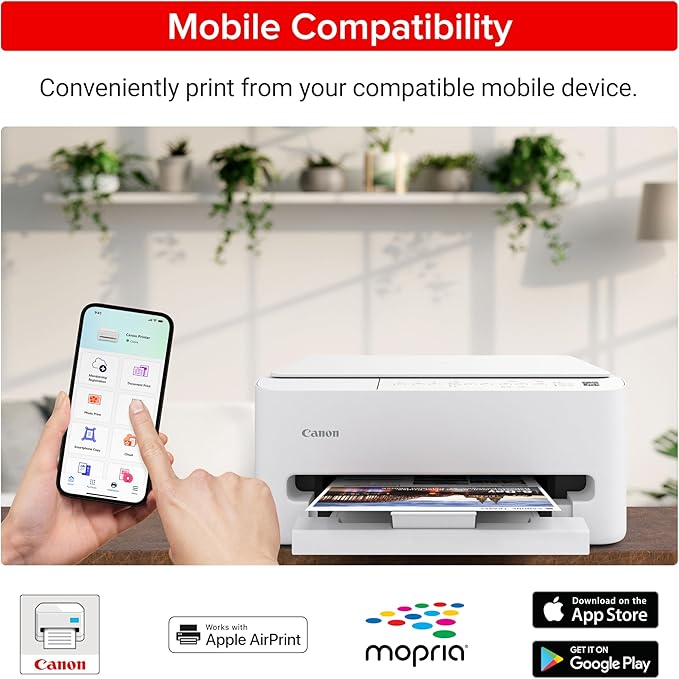
- Convenient Mobile Printing2 - Print directly from your smartphone or tablet with popular services like the Canon PRINT App, Apple AirPrint, and Mopria Print Service
- Eco-Conscious Choice - This printer is EPEAT Silver and ENERGY STAR certified, helping you reduce your environmental footprint
| Printer Type | Inkjet |
| Other Special Features of the Product | Auto-Duplex |
| Printer Output Type | Color |
| Item Weight | 6.96 Pounds (3.16 kg) |
| Item Dimensions D x W x H | 14.8"D x 14"W x 6.7"H (37.6 x 35.6 x 17 cm) |
| Controller Type | Amazon Alexa |
| Print media | Card stock, Envelopes, Glossy photo paper, High-resolution paper, Labels, Paper (plain) |
| Scanner Type | Flatbed |
| Maximum Copy Speed Black and White | 11 ppm |
| EU Spare Part Availability Duration | 1 Years |
| Ink Color | black, cyan, magenta, yellow |
| Additional Printer Functions | Scan |
| Control Method | App, Push Button |
| Compatible Cartridge | PG-295/CL-286 |
| Number of Trays | 1 |
| Resolution | 600 x 600 |
| Maximum Media Size | Letter (8.5 x 11 inches) |
| Maximum Sheet Capacity | 100 |
| Paper Size | 8.5 x 11 Inches (21.6 cm) |
| Output sheet capacity | 100 |
| Maximum print Resolution Color | 1200 x 1200 Dots Per Inch (3048 cm) |
| Maximum Print Resolution Black and White | Up to 1200 x 1200 dpi Dots Per Inch |
| Power Consumption | 21 Watts |
| Wattage | 21 watts |
| Maximum Copy Resolution Color | 600 x 600 dpi |
| Maximum Copy Resolution Black and White | 600 x 600 dpi |
| Brand | Canon |
| Model Name | PIXMA TS4320 |
| Model Number | 7181C002 |
| Built-In Media | PIXMA TS4320 Printer, Power Cord, Setup and Other Documentation, Starter Set of Ink Tanks (PG-295 BK & CL-286) |
| Model Series | PIXMA TS |
| Specific Uses For Product | Home |
| UPC | 013803387193 |
| Manufacturer | Canon |
| Item Type Name | Inkjet Printer |
| Unit Count | 1.0 Count |
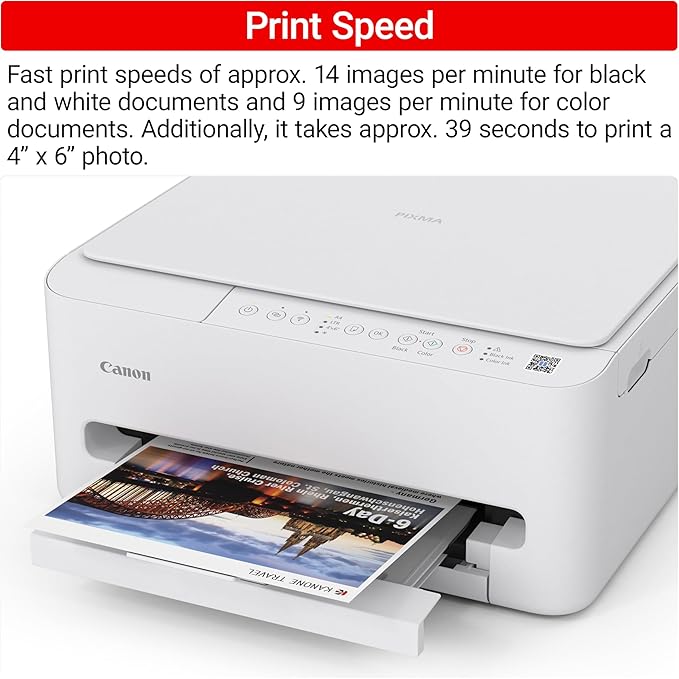
| Color Pages per Minute | 9 ppm |
| B&W Pages per Minute | 14 ppm |
| Initial Page Print Time | 9.5 Seconds |
| Color | White |
| Color Depth | 24 bits_per_pixel |
| Printer Connectivity Type | USB, Wi-Fi |
| Hardware Interface | USB |
| Total Usb Ports | 1 |
| Dual-sided printing | Yes |
| Duplex | Automatic |
| Connectivity Technology | USB, Wi-Fi |
| Printing Technology | Inkjet |
| Special Feature | Auto-Duplex |
| Printer Output | Color |
| Maximum Print Speed (Color) | 9 ppm |
| Max Printspeed Monochrome | 14 ppm |
What's in the box
PIXMA TS4320 Printer
Setup and Other Documentation
Starter Set of Ink Tanks (PG-295 BK & CL-286)
Power Cord
À qui est-ce destiné ?

-
Home Users
Ideal for families needing a versatile printer for everyday documents, photos, and school projects.
-
Students
Great for students who require a compact printer for assignments and study materials in limited spaces.
-
Small Offices
Suitable for small office environments needing reliable duplex printing and scanning without taking up much space.

-
High Volume Users
Not suitable for businesses with heavy printing needs due to slower speeds and lower duty cycle.
-
Professional Photographers
May not meet high-quality printing standards and color accuracy required for professional photography prints.
-
Frequent Travelers
Portable functionality is limited; better options are available for those needing mobile printing solutions.
DESCRIPTION DU PRODUIT
Vous avez une question ? Chattez avec nous
Questions et réponses des clients
-
question:
What are the main features of the Canon PIXMA TS3720 Wireless All-in-One Printer?
répondre: The Canon PIXMA TS3720 offers a compact design and is equipped with wireless capabilities for convenient printing from various devices like smartphones and tablets. It supports mobile printing via Canon Print App, Apple AirPrint, and Google Cloud Print. Additionally, it features a user-friendly interface, a rear paper tray for easy loading, and the ability to print, scan, and copy documents, making it a versatile choice for home use. -
question:
How do I connect the Canon PIXMA TS3720 to my Wi-Fi network?
répondre: To connect the Canon PIXMA TS3720 to your Wi-Fi network, use the built-in control panel. Navigate to the 'Wi-Fi' settings, select your network from the list, and enter the Wi-Fi password. This wireless connection allows you to print seamlessly from your laptop, smartphone, or tablet without needing to be physically connected to the printer, enhancing your printing convenience. -
question:
What type of ink does the Canon PIXMA TS3720 use?
répondre: The Canon PIXMA TS3720 uses individual ink cartridges, specifically the Canon PG-260 and CL-261 series. Using separate cartridges allows you to replace only the color that runs out, which can save on ink costs in the long run. Users often find this economical, particularly for home printing tasks that require frequent color or black-and-white printouts. -
question:
Can the Canon PIXMA TS3720 handle photo printing?
répondre: Yes, the Canon PIXMA TS3720 is capable of printing high-quality photos. With its high-resolution capabilities, it can produce vivid and detailed prints of your favorite images. This makes it great for home use when you want to print family photos or artistic prints, providing the flexibility of both document and photo printing in one device. -
question:
Is the Canon PIXMA TS3720 compatible with mobile printing?
répondre: Absolutely. The Canon PIXMA TS3720 supports various mobile printing solutions, including Apple AirPrint, Google Cloud Print, and the Canon Print App. This compatibility makes it easy to print directly from your smartphone or tablet, ideal for users who are always on the move and want to print documents or photos from their mobile devices without needing a computer. -
question:
What paper sizes can the Canon PIXMA TS3720 print on?
répondre: The Canon PIXMA TS3720 can handle various paper sizes, including standard sizes like A4, Letter, and various photo sizes such as 4x6 inches. This versatility allows users to print everything from regular documents to postcards and photos, making it perfect for diverse printing needs at home. -
question:
How can I troubleshoot connectivity issues with the Canon PIXMA TS3720?
répondre: If you're experiencing connectivity issues with the Canon PIXMA TS3720, start by checking your Wi-Fi connection and ensuring the printer is within range. Restart both the printer and your router to reset the connection. Additionally, verify that your device is connected to the same network as the printer. These steps typically resolve common connectivity problems, allowing for smooth wireless printing. -
question:
What kind of documentation can I scan with the Canon PIXMA TS3720?
répondre: The Canon PIXMA TS3720 can scan various document types, including photographs, receipts, and multipage documents, thanks to its flatbed scanner. This feature is particularly useful for students and professionals who need to digitize important documents or maintain records without the hassle of manual entry. -
question:
Can the Canon PIXMA TS3720 print from cloud services?
répondre: Yes, the Canon PIXMA TS3720 supports printing from various cloud services, including Google Drive and Dropbox, via the Canon Print App. This functionality allows users to print documents directly from their cloud storage, making it a great option for those who frequently work with digital files stored online. -
question:
Where can I buy the Canon PIXMA TS3720 Wireless All-in-One Printer in Madagascar?
répondre: You can purchase the Canon PIXMA TS3720 Wireless All-in-One Printer from Ubuy. Ubuy offers a convenient online shopping experience, allowing you to explore various options and place your order easily from the comfort of your home.
Canon Printers 7181C002 Editorial Review


The Canon PIXMA TS4320 Wireless Color Inkjet Printer has garnered a positive reception from Consumers, particularly for home use. Users appreciate its compact design, which allows it to fit seamlessly into various living spaces, and the ease of setup—most have reported a quick installation process. The printer's multifaceted capabilities—printing, scanning, and copying—together with wireless connectivity, make it particularly convenient for casual everyday tasks. Quality-wise, the TS4320 delivers sharp text and vibrant color prints that meet the expectations for home or light office use. Customers have noted that it operates quietly compared to older models and is much faster in terms of printing speed and ink longevity. The inclusion of duplex printing is a delightful addition that many users find beneficial. While the printer does not come with a document feeder for multi-page scanning and copying, which some users noted as a downside, the affordability of ink and cartridges balanced out this drawback for many reviewers. Overall, the Canon PIXMA TS4320 has proven to be a reliable investment for those seeking a functional and efficient printer without the complexities and high costs associated with other brands. **
Avis et évaluations clients
1483 évaluations des clients
-
5 étoile
69%
-
4 étoile
11%
-
3 étoile
5%
-
2 étoile
2%
-
1 étoile
13%
Donnez votre avis sur ce produit
Partagez votre avis avec d'autres clients
Avantages
- Easy to set up and connect to WiFi
- Compact design, fitting easily in various spaces
- Quick printing speed with decent ink longevity
- Good print quality for everyday documents and casual use
- Duplex printing feature
- Affordable ink cartridge replacements
- Quiet operation compared to older printer models
Les inconvénients
- Lacks a multi-page feeder for scanning and copying
Historique des prix du produit
Informations importantes
- Limitations : Pour les produits expédiés à l'international, veuillez noter que toute garantie du fabricant peut ne pas être valide ; les options de service du fabricant peuvent ne pas être disponibles ; les manuels, instructions et avertissements de sécurité des produits peuvent ne pas être dans les langues du pays de destination ; les produits (et les matériaux qui les accompagnent) peuvent ne pas être conçus conformément aux normes, spécifications et exigences d'étiquetage du pays de destination ; et les produits peuvent ne pas être conformes à la tension et aux autres normes électriques du pays de destination (nécessitant l'utilisation d'un adaptateur ou d'un convertisseur le cas échéant). Il incombe au destinataire de s'assurer que le produit peut être importé légalement dans le pays de destination. En cas de commande auprès d'Ubuy ou de ses filiales, le destinataire est l'importateur officiel et doit se conformer à toutes les lois et réglementations du pays de destination.
- Tous les produits listés sur Ubuy ne sont pas à vendre, Ubuy étant un moteur de recherche mondial. Les produits sont soumis aux réglementations en matière d'exportation et de commerce.
MGA 415560
Commandez maintenant et recevez votre commande aux alentours du Vendredi, Juin 26
This item is not restrict in my country.(Please click on above link if this item is not restrict in your country, So our team will review and allow.)
QTY:
Transaction sécurisée
Ubuy s'engage à protéger votre sécurité et votre confidentialité. Notre système avancé de sécurité des paiements garantit la confidentialité en chiffrant vos informations lors de la transmission grâce aux protocoles AES (Advanced Encryption Standards) et SSL (Secure Socket Layer). Vos coordonnées de paiement sont 100 % sécurisées car nous ne partageons pas vos informations de paiement avec des vendeurs tiers.
nos meilleurs partenaires logistiques
Livraison transfrontalière la plus rapide
Caractéristiques et avantages
- High-quality printing for documents and photos up to 8.5” x 14”.
- Compact design ideal for home use.
- Fast print speeds: approximately 7.7 images per minute for black and 4 for color.
- Easy to set up and maintain with a streamlined process.
- Dual band Wi-Fi for stable and reliable wireless connection.
- Versatile media support for various paper types, including posters and banners.