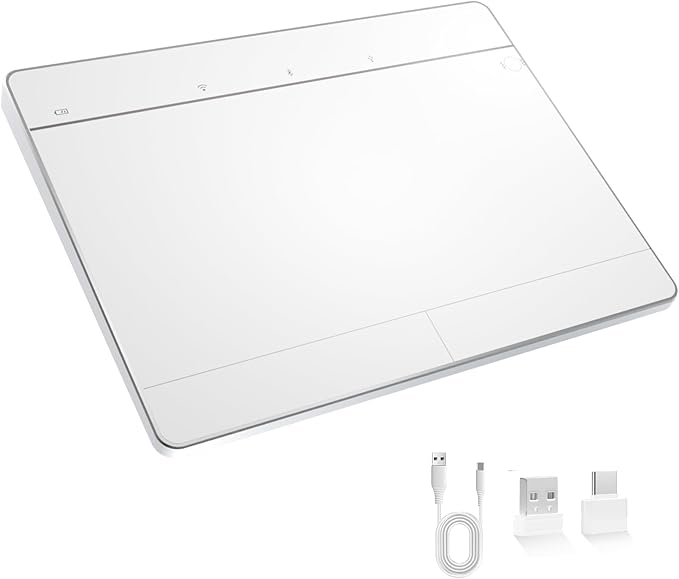
Wireless Bluetooth Trackpad for Windows 10/11, Supports 3 Connection Modes, High-Precision Multi-Gesture Touchpad, Compatible with PC Laptop Computer
Experience seamless compatibility and premium design with long-lasting battery life, all in a sleek package.
Wireless Bluetooth Trackpad for Windows 10/11, Supports 3 Connection Modes, High-Precision Multi-Gesture Touchpad, Compatible with PC Laptop Computer
Numéro d'article: 225752228

Wireless Bluetooth Trackpad for Windows 10/11, Supports 3 Connection Modes, High-Precision Multi-Gesture Touchpad, Compatible with PC Laptop Computer

Numéro d'article: 225752228

MGA 219364

Price Details

Excluding Shipping & Custom charges ( Shipping and custom charges will be calculated on checkout )

*All items will import from États-Unis

En stock
États-Unis Importé depuis la boutique USA
Commandez maintenant et recevez votre commande aux alentours du Jeudi, Juillet 16
Nos meilleurs partenaires logistiques
  • fedex
  • dhl
Experience seamless compatibility and premium design with long-lasting battery life, all in a sleek package.
Garantie U-Care :
Aucun
Sélectionnez un forfait
fast shipping

Livraison
rapide

free return

Retour
gratuit*

Emballage sécurisé

Emballage sécurisé

Produits 100 % originaux

Produits 100 % originaux

pci-dss

Conformité PCI DSS

iso certified

Certifié ISO 27001


paypal payment
visa payment
mastercard payment

Détails du produit

Shop Wireless Bluetooth Trackpad for Windows 10/11, Supports 3 Connection Modes, High-Precision Multi-Gesture Touchpad, Compatible with PC Laptop Computer online at a best price in Madagascar. B0FGZYZ4X2
Item Weight1 lbs (450 grams)

DESCRIPTION DU PRODUIT

Wireless Bluetooth Trackpad for Windows 10/11, Supports 3 Connection Modes, High-Precision Multi-Gesture Touchpad, Compatible with PC Laptop Computer

Vous avez une question ? Chattez avec nous

Questions et réponses des clients

  • question: What devices are compatible with the Wireless Bluetooth Trackpad?

    répondre: The Wireless Bluetooth Trackpad is designed to be compatible with all devices running Windows 10 and Windows 11, including PC and laptop computers. Thanks to its Bluetooth connectivity, it pairs effortlessly with a variety of devices. Whether you're using it for productivity tasks or leisure activities, its versatility makes it an ideal choice for any Windows user.
  • question: What are the three connection modes supported by the trackpad?

    répondre: This trackpad supports three connection modes: Bluetooth, USB, and wired connectivity. This flexibility allows users to connect to their devices via Bluetooth for a wireless experience, utilize USB for direct connection, or use it in wired mode for reliability in critical tasks. This adaptability enhances user convenience and ensures seamless operation across devices.
  • question: What makes the multi-gesture functionality of this trackpad unique?

    répondre: The high-precision multi-gesture functionality enables various gestures such as scrolling, pinching, and swiping, allowing for an intuitive and fluid navigation experience. This feature is incredibly beneficial for users who frequently navigate complex applications, enhancing productivity by facilitating quick commands and seamless multitasking. It's particularly useful for graphic designers and professionals who rely on precise control.
  • question: Is the trackpad suitable for gaming?

    répondre: While the Wireless Bluetooth Trackpad is primarily designed for productivity and everyday use, it can be suitable for casual gaming. Its high-precision tracking ensures that movements are accurately registered, making it feasible for games that don't require complex controls. However, for high-speed or competitive gaming, a traditional gaming mouse might offer a better experience.
  • question: How do I charge or power the Wireless Bluetooth Trackpad?

    répondre: The Wireless Bluetooth Trackpad typically operates on a rechargeable battery, making it convenient for users. You can charge it using a USB cable provided with the product. This ease of charging eliminates the need for frequent battery replacements, ensuring that it remains powered for extended use. It’s ideal for users who appreciate a tidy workspace without the clutter of batteries.
  • question: Can I customize gestures on this trackpad?

    répondre: Yes, users can often customize gestures on the Wireless Bluetooth Trackpad through software settings on their Windows devices. By accessing the system settings, you can modify existing gestures or assign new commands, tailoring the trackpad's functionality to better suit your workflow. This feature is especially beneficial for users who have specific preferences for their operational style.
  • question: Does the trackpad come with any built-in software for enhanced functionality?

    répondre: The Wireless Bluetooth Trackpad usually works seamlessly with Windows 10 and Windows 11's built-in touchpad settings, which allow users to fine-tune sensitivity, speed, and gesture functionality. Additionally, some third-party software options might enhance its capabilities. This integration makes it versatile for both casual users and tech enthusiasts who desire advanced customization.
  • question: What is the benefit of using a wireless trackpad over a traditional mouse?

    répondre: Using a wireless trackpad offers a more streamlined experience, particularly for those with limited desk space. The absence of a physical mouse means less clutter and more flexibility in movement. It’s especially advantageous for mobile workers or those who frequently switch between devices, allowing for fluid transitions and reducing the need for multiple peripherals.
  • question: How does the trackpad enhance user efficiency?

    répondre: The Wireless Bluetooth Trackpad enhances user efficiency through its precise tracking and customizable multi-gesture capabilities. Users can quickly execute commands without lifting their fingers from the surface, significantly speeding up navigation and multitasking. This is particularly useful for professionals who frequently use applications requiring quick access to tools and features.
  • question: Where can I buy the Wireless Bluetooth Trackpad in Madagascar?

    répondre: You can buy the Wireless Bluetooth Trackpad from Ubuy in Madagascar. Ubuy offers a wide selection of tech gadgets, ensuring that you can find the Wireless Bluetooth Trackpad with various features right at your fingertips. Enjoy a hassle-free shopping experience with Ubuy, delivering quality products to enhance your computing setup.

Tacti Trix Touch Pads Editorial Review

The Wireless Bluetooth Trackpad for Windows 10/11 emerges as a noteworthy accessory for PC users seeking a versatile and practical solution for navigating their devices. Customer feedback largely highlights its effective performance, particularly in terms of precision and multi-gesture support. Users appreciate its sleek design and commend its competitive pricing, often comparing it favorably against higher-end alternatives. Most reviewers report a smooth experience with the trackpad's gestures such as scrolling, tapping, and swiping, noting that these features work seamlessly without significant lag. The tactile feedback, while described as "weak," serves its purpose in indicating clicks, and the option to turn this feature on or off is seen as a sensible design choice. The ability to connect via Bluetooth or a USB dongle offers flexibility, although users noted that Bluetooth connectivity tends to be more stable. While the majority of users praise the trackpad's responsiveness and comfort—highlighted by its inclined design—some concerns were expressed regarding the initial Bluetooth connection and the visibility of the buttons, which some found less intuitive. Specific gesture controls, particularly those employing multiple fingers, received mixed reviews, indicating room for improvement in this aspect. Despite minor issues, including a lack of detailed instructions for feature activation, many customers recommend the trackpad for everyday tasks and creative use. The product holds a strong value proposition, particularly for users who require a reliable companion for multitasking and design work on Windows devices. ###

Avis et évaluations clients

5.0
1 évaluations des clients
  • 5 étoile
    100%
  • 4 étoile
    0%
  • 3 étoile
    0%
  • 2 étoile
    0%
  • 1 étoile
    0%

Donnez votre avis sur ce produit

Partagez votre avis avec d'autres clients

Avantages

  • High precision and responsiveness with gestures and clicks
  • Stylish and well-made design comparable to more expensive options
  • Multiple connection modes (Bluetooth and USB)
  • Good build quality and comfort during use
  • Offers flexibility with customizable gesture settings ###

Les inconvénients

  • Some gestures, especially multi-finger, may lack Consistency

Platform Trust & Buyer Confidence

trustpilot logo
4.3/5 9,000 + reviews
Read reviews
MT
Mohd
Verified buyer

“The product received very good packaging & safe…Thank You”

16 June 2026 · via Trustpilot
SJ
Shawati
Verified buyer

“Accurate delivery timing given”

16 June 2026 · via Trustpilot
YB
Youcef
Verified buyer

“Not madly expensive like I thought, and much quicker than promised.”

15 June 2026 · via Trustpilot
LM
Leila
Verified buyer

“Never dealt with Ubuy before, but everything worked out great. Seamless cross border purchasing and shipping. Thanks!”

6/7/2026 · via Trustpilot
KA
Kwame
Verified buyer

“The process was smooth, with clear communication and timelines. This was my 1st purchase and I am really impressed. I will definitely be coming back.”

12 June 2026 · via Trustpilot
Paiement sécurisé Global Delivery Easy Returns Genuine Products

Historique des prix du produit

Informations importantes

  • Limitations : Pour les produits expédiés à l'international, veuillez noter que toute garantie du fabricant peut ne pas être valide ; les options de service du fabricant peuvent ne pas être disponibles ; les manuels, instructions et avertissements de sécurité des produits peuvent ne pas être dans les langues du pays de destination ; les produits (et les matériaux qui les accompagnent) peuvent ne pas être conçus conformément aux normes, spécifications et exigences d'étiquetage du pays de destination ; et les produits peuvent ne pas être conformes à la tension et aux autres normes électriques du pays de destination (nécessitant l'utilisation d'un adaptateur ou d'un convertisseur le cas échéant). Il incombe au destinataire de s'assurer que le produit peut être importé légalement dans le pays de destination. En cas de commande auprès d'Ubuy ou de ses filiales, le destinataire est l'importateur officiel et doit se conformer à toutes les lois et réglementations du pays de destination.
  • Tous les produits listés sur Ubuy ne sont pas à vendre, Ubuy étant un moteur de recherche mondial. Les produits sont soumis aux réglementations en matière d'exportation et de commerce.