0 ratings


Numéro d'article:
139500318
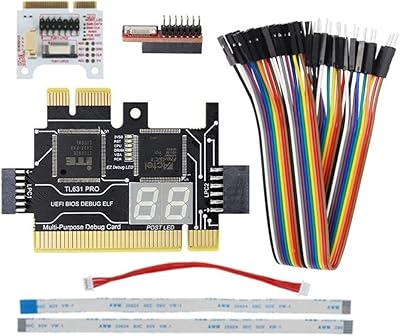
TL631 Pro -DEBUG Diagnostic Card - PCI-E Mini PCI-E Motherboard Multifunction
Numéro d'article:
139500318
MGA 254047
Price Details
Excluding Shipping & Custom charges ( Shipping and custom charges will be calculated on checkout )
*All items will import from États-Unis
0 ratings
Écrire un commentaire
En stock
 Importé depuis la boutique USA
Commandez maintenant et recevez votre commande aux alentours du Jeudi, Août 20
Transaction sécurisée
Ubuy s'engage à protéger votre sécurité et votre confidentialité. Notre système avancé de sécurité des paiements garantit la confidentialité en chiffrant vos informations lors de la transmission grâce aux protocoles AES (Advanced Encryption Standards) et SSL (Secure Socket Layer). Vos coordonnées de paiement sont 100 % sécurisées car nous ne partageons pas vos informations de paiement avec des vendeurs tiers.
Nos meilleurs partenaires logistiques


Experience cutting-edge diagnostics with the TL631 Pro, featuring high-speed channels and comprehensive module support for maximum efficiency.

Livraison
rapide

Retour
gratuit*

Emballage sécurisé

Produits 100 % originaux

Conformité PCI DSS

Certifié ISO 27001


Ce qui se démarque
Comprehensive Diagnostics
Equipped with advanced diagnostic capabilities, the TL631 Pro efficiently detects motherboard issues, enabling swift troubleshooting and minimizing downtime for users in need of immediate technical support.
Versatile Compatibility
Supports both PCI-E and Mini PCI-E interfaces, making it ideal for a range of devices. This versatility ensures that users can seamlessly integrate it into various systems without compatibility concerns.
User-Friendly Design
The TL631 Pro features an intuitive LED display for clear error code reading, allowing users to quickly identify and resolve problems without extensive technical knowledge, enhancing usability for both professionals and hobbyists.
Détails du produit
| Product Dimensions (L x W x H) | 4.72 x 3.15 x 1.18 inches (12 x 8 x 3 cm) |
| Item Weight | 1.94 ounces (55 grams) |
| Item model number | 500327296 |
| Date First Available | February 7, 2023 |
| Manufacturer | pizarra |
| Brand | pizarra |
| CPU Socket | LGA 2011 |
| Compatible Devices | Personal Computer, Laptop, Desktop, Server |
| RAM Memory Technology | DRAM |
| Compatible Processors | Intel processors |
| Chipset Type | Intel X99 |
| Model Name | 500327296 |
| Main Power Connector Type | 24-Pin |
| Graphics Card Interface | Integrated, PCI, PCI Express |
| Memory Slots Available | 1 |
À qui est-ce destiné ?

-
Tech Enthusiasts
Perfect for individuals who love to troubleshoot and optimize their PC performance using detailed diagnostic codes.
-
Hardware Technicians
Ideal for repair technicians diagnosing motherboard issues quickly and efficiently with real-time error codes.
-
Overclockers
Great for overclocking enthusiasts monitoring system stability and detecting issues during hardware performance tuning.

-
Casual Users
Not suitable for everyday users who don’t have technical knowledge or need simple troubleshooting tools.
DESCRIPTION DU PRODUIT
TL631 Pro -DEBUG Diagnostic Card - PCI-E Mini PCI-E Motherboard Multifunction
Vous avez une question ? Chattez avec nous
Questions et réponses des clients
-
question:
What is the TL631 Pro -DEBUG Diagnostic Card used for?
répondre: The TL631 Pro -DEBUG Diagnostic Card is designed for diagnosing issues on motherboards, particularly in computer systems. It reads POST (Power-On Self-Test) codes and displays them, helping technicians and enthusiasts troubleshoot problems related to hardware failures, such as RAM or CPU errors. This diagnostic tool is especially useful during system builds or upgrades, allowing users to quickly pinpoint the source of failures before investing time and resources into repairs. -
question:
How does the TL631 Pro -DEBUG Diagnostic Card work?
répondre: The TL631 Pro -DEBUG Diagnostic Card connects to the PCI-E or Mini PCI-E slots on a motherboard. Once powered, it reads POST codes generated by the motherboard during initialization and displays them on its LED screen. Users can reference a provided code table to diagnose issues, effectively reducing troubleshooting time. This is beneficial for both new builds and when diagnosing existing systems with intermittent failures or boot issues. -
question:
Is the TL631 Pro -DEBUG Diagnostic Card compatible with all motherboards?
répondre: The TL631 Pro -DEBUG Diagnostic Card is compatible with most modern motherboards that have PCI-E or Mini PCI-E slots. However, it is always advisable to consult the motherboard's specifications or the product manual to confirm compatibility. This card can be particularly helpful when working with high-performance gaming or workstation setups, ensuring that all components function correctly and efficiently. -
question:
What features does the TL631 Pro -DEBUG Diagnostic Card offer?
répondre: The TL631 Pro -DEBUG Diagnostic Card offers several valuable features, including an LED display for real-time status codes, support for various PCI-E slots, and the ability to diagnose multiple hardware issues. Additionally, its compact design allows for easy installation and usage in confined spaces. These features make it an essential tool for both professional and hobbyist builders, providing insight into problems during initial boot processes or system failures. -
question:
Can I use the TL631 Pro -DEBUG Diagnostic Card for overclocking?
répondre: While the TL631 Pro -DEBUG Diagnostic Card is primarily a diagnostic tool for troubleshooting motherboard issues, it can indirectly assist with overclocking by helping users identify instability caused by improper clock settings. By monitoring POST codes, users can quickly adjust settings in the BIOS, ensuring their overclocked components are stable and functional. This makes it a useful companion for any enthusiast aiming to enhance system performance safely. -
question:
What should I do if the TL631 Pro -DEBUG Diagnostic Card does not display any codes?
répondre: If the TL631 Pro -DEBUG Diagnostic Card does not display any POST codes, first ensure that it is correctly installed in a compatible PCI-E slot and that the motherboard is powered. If the card is still unresponsive, check the motherboard for power supply issues or hardware connections. This situation allows users to systematically narrow down potential problems, often leading back to connections or faulty components that may require replacement. -
question:
Is the TL631 Pro -DEBUG Diagnostic Card portable?
répondre: The TL631 Pro -DEBUG Diagnostic Card is compact and lightweight, making it quite portable. This is advantageous for technicians and computer enthusiasts who frequently work on different systems or travel for repairs. Its portability ensures that you always have a reliable diagnostic tool at hand, which can streamline troubleshooting processes, especially in situations where immediate analysis of hardware issues is crucial. -
question:
How can I read the codes displayed by the TL631 Pro -DEBUG Diagnostic Card?
répondre: The TL631 Pro -DEBUG Diagnostic Card comes with a reference table that correlates each displayed POST code to specific hardware issues. Once the LED display shows a code, users can consult the table to determine the exact problem. This streamlined approach to troubleshooting can significantly reduce downtimes, allowing for quicker resolutions and efficient system maintenance, which is vital in both personal use and professional repair scenarios. -
question:
What types of hardware issues can the TL631 Pro -DEBUG Diagnostic Card help identify?
répondre: The TL631 Pro -DEBUG Diagnostic Card can assist in identifying a variety of hardware issues, including RAM faults, CPU malfunctions, GPU problems, and power supply shortcomings. When a system fails to boot, the diagnostic card provides crucial insight into which component may be failing. This capability is particularly important for technicians handling multiple systems or users experiencing recurrent issues, as it pinpoints problems with high accuracy. -
question:
Where can I buy TL631 Pro -DEBUG Diagnostic Card - PCI-E Mini PCI-E Motherboard Multifunction in Madagascar?
répondre: You can purchase the TL631 Pro -DEBUG Diagnostic Card - PCI-E Mini PCI-E Motherboard Multifunction from Ubuy. They offer a comprehensive selection of electronics and diagnostic tools, ensuring that you receive a quality product delivered directly to you. Ubuy's platform makes it convenient to find necessary components for your computer system, contributing to smoother troubleshooting experiences.
pizarra Motherboards 500327296 Editorial Review
Aucune critique éditoriale trouvée
Avis et évaluations clients
1 évaluations des clients
-
5 étoile
100%
-
4 étoile
0%
-
3 étoile
0%
-
2 étoile
0%
-
1 étoile
0%
Donnez votre avis sur ce produit
Partagez votre avis avec d'autres clients
Platform Trust & Buyer Confidence

MT
Mohd
Verified buyer
“The product received very good packaging & safe…Thank You”
16 June 2026 · via Trustpilot
SJ
Shawati
Verified buyer
“Accurate delivery timing given”
16 June 2026 · via Trustpilot
YB
Youcef
Verified buyer
“Not madly expensive like I thought, and much quicker than promised.”
15 June 2026 · via Trustpilot
LM
Leila
Verified buyer
“Never dealt with Ubuy before, but everything worked out great. Seamless cross border purchasing and shipping. Thanks!”
6/7/2026 · via Trustpilot
KA
Kwame
Verified buyer
“The process was smooth, with clear communication and timelines. This was my 1st purchase and I am really impressed. I will definitely be coming back.”
12 June 2026 · via Trustpilot
Paiement sécurisé
Global Delivery
Easy Returns
Genuine Products
Historique des prix du produit
Informations importantes
- Limitations : Pour les produits expédiés à l'international, veuillez noter que toute garantie du fabricant peut ne pas être valide ; les options de service du fabricant peuvent ne pas être disponibles ; les manuels, instructions et avertissements de sécurité des produits peuvent ne pas être dans les langues du pays de destination ; les produits (et les matériaux qui les accompagnent) peuvent ne pas être conçus conformément aux normes, spécifications et exigences d'étiquetage du pays de destination ; et les produits peuvent ne pas être conformes à la tension et aux autres normes électriques du pays de destination (nécessitant l'utilisation d'un adaptateur ou d'un convertisseur le cas échéant). Il incombe au destinataire de s'assurer que le produit peut être importé légalement dans le pays de destination. En cas de commande auprès d'Ubuy ou de ses filiales, le destinataire est l'importateur officiel et doit se conformer à toutes les lois et réglementations du pays de destination.
- Tous les produits listés sur Ubuy ne sont pas à vendre, Ubuy étant un moteur de recherche mondial. Les produits sont soumis aux réglementations en matière d'exportation et de commerce.
MGA 254047
Commandez maintenant et recevez votre commande aux alentours du Jeudi, Août 20
This item is not restrict in my country.(Please click on above link if this item is not restrict in your country, So our team will review and allow.)
QTY:
Transaction sécurisée
PCI DSS compliant and ISO 27001:2022 certified, with encrypted payments and full buyer protection on every order.
Nos meilleurs partenaires logistiques
Livraison transfrontalière la plus rapide
Caractéristiques et avantages
- High-speed LPC1 shared channel for motherboard connectivity.
- Supports all PCI slots and offers PCI high-speed channel.
- Includes indicators for CPU, DRAM, and VGA graphics for real-time monitoring.
- Comes with various modules and cables for expandability.
- Utilizes advanced 130-nanometer Actel ProASIC3 flash memory technology.
- Sleek design with integrated digital displays for easy reading.
Ubuy Assurance
Experience worry-free shopping with 100% original products, PCI DSS-compliant payment security, ISO 27001-certified data protection, the fastest cross-border delivery, free returns *, and secure packaging on every order.