- Page d'accueil /
- Électronique /
- Computer Accessories /
- Computer Accessories & Peripherals /
- Keyboards, Mice & Accessories /
- Computer Keyboards /
- Universal Laptop Keyboard Tester Testing Devi...
0 ratings







Numéro d'article:
32191796
Universal Laptop Keyboard Tester Testing Device Machine Tool USB Interface QK-AK5 with USB Charging Data Cable
87% des répondants recommanderaient ceci à un ami
Numéro d'article:
32191796
MGA 196916
Price Details
Excluding Shipping & Custom charges ( Shipping and custom charges will be calculated on checkout )
*All items will import from États-Unis
8%
0 ratings
Écrire un commentaire
En stock
 Importé depuis la boutique USA
QTY:
Commandez maintenant et recevez votre commande aux alentours du Monday, Août 17
Transaction sécurisée
Ubuy s'engage à protéger votre sécurité et votre confidentialité. Notre système avancé de sécurité des paiements garantit la confidentialité en chiffrant vos informations lors de la transmission grâce aux protocoles AES (Advanced Encryption Standards) et SSL (Secure Socket Layer). Vos coordonnées de paiement sont 100 % sécurisées car nous ne partageons pas vos informations de paiement avec des vendeurs tiers.
Nos meilleurs partenaires logistiques


Test any keyboard with ease and accuracy using this universal laptop keyboard tester with multiple connectors.

Livraison
rapide

Retour
gratuit*

Emballage sécurisé

Produits 100 % originaux

Conformité PCI DSS

Certifié ISO 27001


Ce qui se démarque
Universal Compatibility
Designed to test various laptop keyboards across multiple brands, ensuring versatility and user convenience for technicians handling different devices.
USB Powered
Features a USB interface for easy connection and charging, eliminating the need for batteries while providing a reliable power source during testing.
Portable Design
Lightweight and compact, the QK-AK5 is easy to carry, making it ideal for on-the-go technicians and ensuring tests can be performed anywhere.
Détails du produit
- New Laptop Keyboard Tester Testing Device Machine Tool USB Interface QK-AK5 with Free USB Charging Cable for Apple Samsung Dell HP ASUS Sony Acer Huawei Lenovo and so on
- This is an universal laptop keyboard tester with several test cable connector, you can use it to test any keyboard with cable
- This device is easy to use:
1). Connect it to a computer by the USB cable.
2). Insert the keyboard cable into the corresponding connector.
3). Push the opening button, the device will sound 1 times, which means it starts working.
4). Press keys of the keyboard, if every keys sound, it means the keyboard is good, if not, the keyboard has problem. If the sound is long and can not stop, the keyboard might be bad or the cable is not installed correctly or firmly. - Package included: 1x laptop tester/testing device, 1x USB Charging Cable.
| Compatible Devices | Laptop |
| Connectivity Technology | Bluetooth, USB |
| Additional Features | Split Keyset Design |
| Power Source | USB port (DC power supply) |
| Keyboard Layout | QWERTY |
| Hand Orientation | Ambidextrous |
| Compatible Operating System Family | MacOS |
| Number of Keys | 17 |
| Color | Black |
| Style Name | Contemporary |
| Enclosure Material | Acrylonitrile Butadiene Styrene |
| Brand | Rinbers |
| Keyboard Description | Keyboard Tester |
| Antenna Location | Business |
| Built-In Media | USB Cable |
| Model Number | RBS-20171022 |
| Unit Count | 1.0 Count |
| Manufacturer | Rinbers Tech |
| UPC | 645100799623 |
| Mfr Part Number | RBS-20171022 |
| Recommended Uses For Product | Business |
| Special Feature | Split Keyset Design |
| Style | Contemporary |
| Material | Acrylonitrile Butadiene Styrene |
| Included Components | USB Cable |
| Item Weight | 0.5 lbs (230 grams) |
What's in the box
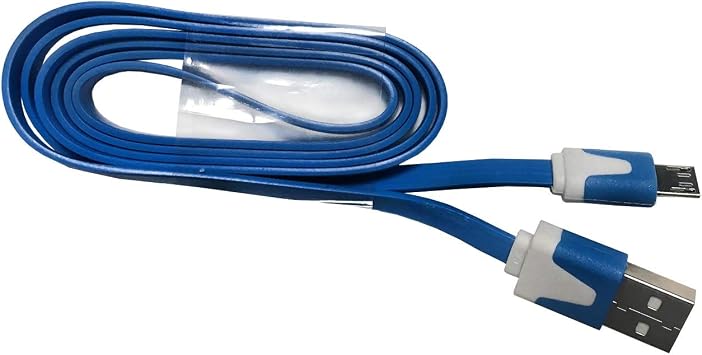
USB Cable
À qui est-ce destiné ?

-
Hardware Technicians
Ideal for professionals who need to test laptop keyboards for functionality and connectivity with precision.
-
Laptop Repair Shops
Useful for repair businesses that require a reliable tool to diagnose keyboard issues in various laptop models.
-
DIY Enthusiasts
Beneficial for tech-savvy individuals who enjoy building or refurbishing laptops and want to ensure keyboard performance.

-
Casual Users
Not suitable for occasional laptop users who do not frequently troubleshoot or repair keyboards.
-
Non-technical Individuals
May be confusing for users without technical knowledge, as it is designed primarily for professionals.
-
Budget-Conscious Buyers
Not recommended for users seeking inexpensive alternatives for simple keyboard checks without detailed diagnostics.
DESCRIPTION DU PRODUIT
About This Item
Introducing the Rinbers Universal Laptop Keyboard Tester Testing Device Machine Tool, a must-have for all laptop owners out there! Are you tired of dealing with unresponsive keys or a malfunctioning keyboard on your laptop? Look no further, because this fantastic keyboard tester is here to save the day. With its USB Interface QK-AK5, this keyboard tester is compatible with various laptop brands such as Apple, Samsung, Dell, HP, ASUS, Sony, Acer, Huawei, Lenovo, and so many more. No matter which laptop brand you own, this device is guaranteed to work for you.
Not only does this incredible tool test your laptop keyboard, but it also comes with a USB charging data cable. This means that you can conveniently charge your device while you analyze and fix any keyboard issues you may have. Don't worry about compatibility issues because this universal laptop keyboard tester works seamlessly with any laptop that has a USB interface.
Simply plug it in, and you're good to go. The USB interface keyboard tester comes with a user-friendly design that allows you to test each key on your laptop's keyboard individually. Easily identify if any keys are not working or if there are any connectivity issues.
No more wasting time and money on expensive keyboard repairs or replacements. With the Rinbers Universal Laptop Keyboard Tester Testing Device Machine Tool, you can quickly and accurately diagnose any keyboard problems and fix them at home. Say goodbye to the frustration of typing on a faulty keyboard.
Take control of your laptop's performance with this reliable and efficient keyboard tester. Get yours now and ensure a smooth and hassle-free typing experience on your laptop.
Vous avez une question ? Chattez avec nous
Questions et réponses des clients
-
question:
What is the purpose of the Universal Laptop Keyboard Tester QK-AK5?
répondre: The Universal Laptop Keyboard Tester QK-AK5 is designed to help users efficiently test and diagnose issues with laptop keyboards. This device allows you to check the functionality of each key, ensuring they respond accurately when pressed. This is particularly useful for technicians, DIY enthusiasts, or anyone who wants to verify keyboard performance before assembling a laptop. By using this tester, you can quickly identify faulty keys or connections, facilitating effective troubleshooting or repair. -
question:
How does the USB interface work with the QK-AK5?
répondre: The QK-AK5 features a user-friendly USB interface that allows you to connect the tester directly to a laptop or computer. Once connected, you can begin testing the keyboard by pressing the keys, and the device will display which keys are functioning correctly. This direct connection simplifies the testing process, making it accessible for users without extensive technical knowledge. It is perfect for anyone needing a reliable method to ensure their keyboard’s integrity before use or installation. -
question:
Is the QK-AK5 compatible with all laptops?
répondre: Yes, the QK-AK5 is designed to be compatible with a wide range of laptop models and keyboards. Its universal design ensures that it can effectively test both standard and non-standard keys found on most laptops. This versatility makes it a valuable tool for technicians working on various brands and models, providing a comprehensive solution when diagnosing keyboard issues. Whether you're dealing with gaming laptops, business laptops, or refurbished units, this device is equipped to handle diverse testing requirements. -
question:
Can I charge the QK-AK5 while using it?
répondre: Absolutely! The QK-AK5 comes with a USB charging data cable that allows you to charge the device while it is in use. This feature is particularly beneficial for extended testing sessions, ensuring you won’t run out of power as you perform diagnostics on multiple keyboards. It enables technicians to maximize their efficiency by allowing continuous operation without interruptions, making it ideal for professional repair services or frequent DIY projects. -
question:
What additional features does the QK-AK5 offer?
répondre: In addition to basic keyboard testing, the QK-AK5 may include features such as LED indicators to signal key responses, simplification in identifying malfunctioning keys, and a lightweight design for portability. These features enhance the overall user experience, allowing for quick diagnostics in various settings—whether at a repair shop or in the comfort of home. The clarity of the interface also facilitates easy understanding of keyboard functionality for all users, simplifying the troubleshooting process. -
question:
What type of users would benefit from the QK-AK5?
répondre: The QK-AK5 is suitable for a diverse group of users, including IT professionals, technicians, gamers, and everyday laptop users. IT professionals can quickly ascertain key performance, while technicians rely on it to diagnose and repair keyboard issues efficiently. Gamers, who need reliable keyboard functionality for optimal performance, benefit from proactively testing their devices. Even casual users can ensure their keyboards are in good working condition before use, making it a versatile tool for everyone. -
question:
How do I properly use the QK-AK5 for keyboard testing?
répondre: To use the QK-AK5, simply connect it to your laptop via the USB interface using the included charging data cable. Once connected, start pressing each key on your keyboard. The tester will indicate which keys are functioning and which are not, often through LED lights or a display. For optimal results, ensure that the connections are secure and try to test all keys systematically. This allows for efficient identification of any non-responsive keys, making your troubleshooting process seamless. -
question:
Does the QK-AK5 require any software installation?
répondre: No, the QK-AK5 operates as a plug-and-play device without the need for additional software installation. Simply connect it to a laptop, and you can start testing your keyboard immediately. This straightforward operation is particularly advantageous for users who may not be tech-savvy or those who want to avoid the hassle of downloading and installing software. The simplicity of the QK-AK5 allows for immediate functionality, which is ideal for on-the-go diagnostics. -
question:
What should I do if a key on my laptop isn’t working after using the QK-AK5?
répondre: If the QK-AK5 indicates that a key is unresponsive, it may suggest either a hardware issue or the need for a connection check. First, ensure the keyboard is securely connected to the laptop. If the issue persists, further inspection may be necessary, such as checking for dirt or damage under the keycap. In some cases, replacement of the keyboard or specific key may be required. The QK-AK5 serves as an initial diagnostic tool, guiding you towards the next steps based on its findings. -
question:
Where can I buy the Universal Laptop Keyboard Tester QK-AK5 in Madagascar?
répondre: You can buy the Universal Laptop Keyboard Tester QK-AK5 at Ubuy in Madagascar. Ubuy offers a wide range of products with competitive pricing and a user-friendly shopping experience, making it easy for you to purchase this essential testing device. With their secure online platform and varied payment options, you can conveniently order and have the device delivered right to your doorstep, ensuring you have the right tool to maintain your laptop's performance.
Rinbers Keyboards RBS-20171022 Editorial Review
Aucune critique éditoriale trouvée
Avis et évaluations clients
27 évaluations des clients
-
5 étoile
67%
-
4 étoile
20%
-
3 étoile
0%
-
2 étoile
9%
-
1 étoile
4%
Donnez votre avis sur ce produit
Partagez votre avis avec d'autres clients
Platform Trust & Buyer Confidence

MT
Mohd
Verified buyer
“The product received very good packaging & safe…Thank You”
16 June 2026 · via Trustpilot
SJ
Shawati
Verified buyer
“Accurate delivery timing given”
16 June 2026 · via Trustpilot
YB
Youcef
Verified buyer
“Not madly expensive like I thought, and much quicker than promised.”
15 June 2026 · via Trustpilot
LM
Leila
Verified buyer
“Never dealt with Ubuy before, but everything worked out great. Seamless cross border purchasing and shipping. Thanks!”
6/7/2026 · via Trustpilot
KA
Kwame
Verified buyer
“The process was smooth, with clear communication and timelines. This was my 1st purchase and I am really impressed. I will definitely be coming back.”
12 June 2026 · via Trustpilot
Paiement sécurisé
Global Delivery
Easy Returns
Genuine Products
Historique des prix du produit
Informations importantes
- Limitations : Pour les produits expédiés à l'international, veuillez noter que toute garantie du fabricant peut ne pas être valide ; les options de service du fabricant peuvent ne pas être disponibles ; les manuels, instructions et avertissements de sécurité des produits peuvent ne pas être dans les langues du pays de destination ; les produits (et les matériaux qui les accompagnent) peuvent ne pas être conçus conformément aux normes, spécifications et exigences d'étiquetage du pays de destination ; et les produits peuvent ne pas être conformes à la tension et aux autres normes électriques du pays de destination (nécessitant l'utilisation d'un adaptateur ou d'un convertisseur le cas échéant). Il incombe au destinataire de s'assurer que le produit peut être importé légalement dans le pays de destination. En cas de commande auprès d'Ubuy ou de ses filiales, le destinataire est l'importateur officiel et doit se conformer à toutes les lois et réglementations du pays de destination.
- Tous les produits listés sur Ubuy ne sont pas à vendre, Ubuy étant un moteur de recherche mondial. Les produits sont soumis aux réglementations en matière d'exportation et de commerce.
MGA 196916
Commandez maintenant et recevez votre commande aux alentours du Monday, Août 17
This item is not restrict in my country.(Please click on above link if this item is not restrict in your country, So our team will review and allow.)
QTY:
Transaction sécurisée
PCI DSS compliant and ISO 27001:2022 certified, with encrypted payments and full buyer protection on every order.
Nos meilleurs partenaires logistiques
Livraison transfrontalière la plus rapide
Caractéristiques et avantages
- Universal laptop keyboard tester
- Multiple test cable connectors
- Easy to use with USB interface
- Ensures accurate keyboard testing
- Includes USB charging cable
- Compatible with various laptop brands
Ubuy Assurance
Experience worry-free shopping with 100% original products, PCI DSS-compliant payment security, ISO 27001-certified data protection, the fastest cross-border delivery, free returns *, and secure packaging on every order.