0 ratings

Numéro d'article:
28880160
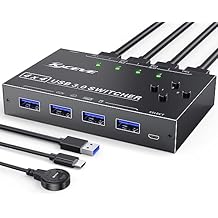
USB 3.0 Switch Selector 4 Port,MLEEDA KVM Switcher 4 Computers Sharing 4 USB Devices,USB Peripheral Switcher for Keyboard Mouse Printer Scanner,with
Numéro d'article:
28880160
MGA 202528
Price Details
Excluding Shipping & Custom charges ( Shipping and custom charges will be calculated on checkout )
*All items will import from États-Unis
0 ratings
Écrire un commentaire
En stock
 Importé depuis la boutique USA
QTY:
Ce produit n'est pas livré par Ubuy et peut prendre au minimum 10 jours pour être livré. Il se peut que nous annulions le produit de la commande et que nous vous remboursions si un problème survient avec la livraison de ce produit.
Transaction sécurisée
Ubuy s'engage à protéger votre sécurité et votre confidentialité. Notre système avancé de sécurité des paiements garantit la confidentialité en chiffrant vos informations lors de la transmission grâce aux protocoles AES (Advanced Encryption Standards) et SSL (Secure Socket Layer). Vos coordonnées de paiement sont 100 % sécurisées car nous ne partageons pas vos informations de paiement avec des vendeurs tiers.
Nos meilleurs partenaires logistiques


Control 2 computers with one set of mouse and keyboard, 2 computers share one monitor

Livraison
rapide

Retour
gratuit*

Emballage sécurisé

Produits 100 % originaux

Conformité PCI DSS

Certifié ISO 27001


Ce qui se démarque
Multi-Computer Sharing
Easily switch between four computers to share USB devices, enhancing efficiency for users needing seamless control in multi-device environments.
Fast Data Transfer
Supports USB 3.0 technology for high-speed data transfers, ensuring rapid file sharing between connected devices without lag or interruptions.
Convenient Remote Control
Includes a wired remote button for effortless toggling between computers, simplifying operations and minimizing physical hassle when accessing various peripherals.
Détails du produit
| Item Weight | 1 lbs (450 grams) |
À qui est-ce destiné ?

-
Office Workers
Ideal for users managing multiple computers while needing to switch keyboards and mice efficiently.
-
Home Office Setup
Great for individuals in a home office who want to connect various devices like printers and scanners.
-
Tech Enthusiasts
Perfect for tech users who require easy access to multiple computers for testing or development work.

-
Single Computer Users
Not suitable for individuals using one computer without the need for multiple device sharing.
-
High-Speed Gaming
May not provide the best performance for gamers needing ultra-low latency connections.
-
Occasional Users
Not practical for users who rarely need to switch between USB devices or computers.
DESCRIPTION DU PRODUIT
USB 3.0 Switch Selector 4 Port,MLEEDA KVM Switcher 4 Computers Sharing 4 USB Devices,USB Peripheral Switcher for Keyboard Mouse Printer Scanner,with Wired Remote Button and 4 USB 3.0 Cable
About This Item
Introducing our KVM Switch HDMI 2 Port Box, the ultimate solution for those looking to streamline their workstation and maximize efficiency. With this versatile switch, you can easily share one set of wired or wireless keyboard and mouse, as well as one monitor, between two computers or laptops. Our KVM switch utilizes advanced technology, including a high-precision encryption chip and gold-plated interfaces, ensuring optimal compatibility and durability.
You can trust that it will work seamlessly to control your PCs without any complications. One of the standout features of our switch is its ability to wake up your computer from hibernation using just the keyboard and mouse. This convenient functionality allows you to quickly resume work without any delays.
Additionally, our switch supports wired or wireless keyboards and mice, giving you flexibility in your setup. Thanks to its HDCP standard and adaptive EDID/HDCP decryption, our switch can adapt to complex application environments, ensuring a smooth and stable image display. It also has a built-in automatic adjustment system to further enhance image quality. Not only is our switch incredibly functional, but it is also incredibly easy to use. You won't need to install any drivers and it supports hot plug, making it a hassle-free addition to your workstation.
Plus, it is powered via USB, eliminating the need for a separate power adapter. Please note that our switch is specifically designed to support keyboards and mice, and may not recognize other USB devices such as USB cameras, printers, or U disks. If you experience any issues with your keyboard and mouse, we recommend updating the USB drivers on your computer. To ensure the best performance and support for resolutions above 1080p or 4K, we recommend using an HDMI 2.0 cable. HDMI 1.4 cables may not be able to handle higher resolutions effectively. We understand that you may have some specific compatibility concerns, and we're here to address them.
Our switch is compatible with computer DVI or Displayport interfaces, but you will need a DVI to HDMI cable and a Displayport to HDMI converter (not included in the package). Additionally, our switch supports Mac Mini, but you may need to adjust the resolution of your Mac Mini to 1920*1080p@60hz. If your device resolution exceeds our standard, we recommend downscaling the resolution for optimal performance. Experience seamless control and enhanced productivity with our KVM Switch HDMI 2 Port Box.
Upgrade your workstation today and take your efficiency to new heights. Shop now and enjoy the benefits of a clutter-free and streamlined setup.
Vous avez une question ? Chattez avec nous
Questions et réponses des clients
-
question:
What is a Displayport Dual Monitor KVM Switch?
répondre: A Displayport Dual Monitor KVM Switch allows you to control two monitors and multiple computers from a single set of peripherals (keyboard and mouse). This device supports high resolutions, including 8K at 60Hz and 4K at 144Hz, ensuring a smooth visual experience whether you’re working or gaming. It's ideal for professionals who need to switch between systems frequently without the hassle of multiple setups. -
question:
What are the benefits of using the MLEEDA KVM Switch?
répondre: The MLEEDA KVM Switch enhances productivity by allowing seamless switching between three computers while supporting two monitors. The four USB 3.0 ports enable fast connections for additional devices like printers or external drives. This functionality is particularly beneficial for gamers or designers who require robust performance across multiple systems without sacrificing display quality. -
question:
Can I use the KVM switch with different operating systems?
répondre: Yes, the MLEEDA KVM Switch is compatible with various operating systems including Windows, macOS, and Linux. This flexibility allows you to integrate different computers into your workspace seamlessly. Users who work with diverse platforms often find this feature particularly valuable as it supports a more unified workflow. -
question:
How do I connect my devices to the KVM switch?
répondre: Connecting your devices to the MLEEDA KVM Switch is straightforward. You’ll connect your computers to the HDMI or DisplayPort inputs, and then attach your monitors and USB peripherals to the respective ports. This setup allows quick toggling between devices, making it straightforward for users who need to access different systems rapidly throughout their workday. -
question:
Does the KVM Switch support audio output?
répondre: Yes, the MLEEDA KVM Switch supports audio output alongside video, providing a full multimedia experience. This means you won’t need additional audio cables or setups, making your workspace more organized. It's perfect for those who engage in activities that require sound, like streaming, gaming, or video conferencing, as it simplifies your audio management. -
question:
What resolutions does the MLEEDA KVM Switch support?
répondre: The MLEEDA KVM Switch supports impressive resolutions, up to 8K at 60Hz and 4K at 144Hz. Such high-definition video output is ideal for gamers and graphics professionals who need sharp images and fluid motion. This feature ensures that you can enjoy your multimedia experiences without compromising on quality, enhancing your overall usage experience. -
question:
Can this KVM switch be used for gaming?
répondre: Absolutely. The high refresh rates and resolution support of the MLEEDA KVM Switch make it excellent for gaming. Gamers can enjoy their favorite titles on dual monitors without lag or distortion. This switch allows seamless transitions between gaming consoles or PCs, providing an enhanced gaming setup that maximizes performance and responsiveness. -
question:
What types of connectivity does the KVM switch offer?
répondre: The MLEEDA KVM Switch offers a combination of DisplayPort and USB connections, allowing for a broad range of devices to be connected simultaneously. Such versatility ensures that you can connect everything from monitors and keyboard/mouse setups to external drives. This is especially useful for content creators who rely on multiple peripherals for their projects. -
question:
How does the switch handle multiple monitors?
répondre: The MLEEDA KVM Switch can efficiently manage dual monitors by duplicating or extending displays depending on your setup preference. This capability is ideal for users who require extensive screen real estate for multitasking or for immersive gaming experiences. You can easily switch between different dual monitor setups, catering to varied tasks or preferences. -
question:
Where can I buy the Displayport Dual Monitor KVM Switch?
répondre: You can buy the Displayport Dual Monitor KVM Switch from Ubuy, which offers a wide range of tech products including this model. Ubuy provides convenient options for browsing and purchasing, making it easy to find what you need. With a straightforward user interface and quick access to product information, Ubuy is a reliable platform for your tech shopping.
MLEEDA KVM Switches Editorial Review
Aucune critique éditoriale trouvée
Avis et évaluations clients
1 évaluations des clients
-
5 étoile
100%
-
4 étoile
0%
-
3 étoile
0%
-
2 étoile
0%
-
1 étoile
0%
Donnez votre avis sur ce produit
Partagez votre avis avec d'autres clients
Platform Trust & Buyer Confidence

MT
Mohd
Verified buyer
“The product received very good packaging & safe…Thank You”
16 June 2026 · via Trustpilot
SJ
Shawati
Verified buyer
“Accurate delivery timing given”
16 June 2026 · via Trustpilot
YB
Youcef
Verified buyer
“Not madly expensive like I thought, and much quicker than promised.”
15 June 2026 · via Trustpilot
LM
Leila
Verified buyer
“Never dealt with Ubuy before, but everything worked out great. Seamless cross border purchasing and shipping. Thanks!”
6/7/2026 · via Trustpilot
KA
Kwame
Verified buyer
“The process was smooth, with clear communication and timelines. This was my 1st purchase and I am really impressed. I will definitely be coming back.”
12 June 2026 · via Trustpilot
Paiement sécurisé
Global Delivery
Easy Returns
Genuine Products
Historique des prix du produit
Informations importantes
- Limitations : Pour les produits expédiés à l'international, veuillez noter que toute garantie du fabricant peut ne pas être valide ; les options de service du fabricant peuvent ne pas être disponibles ; les manuels, instructions et avertissements de sécurité des produits peuvent ne pas être dans les langues du pays de destination ; les produits (et les matériaux qui les accompagnent) peuvent ne pas être conçus conformément aux normes, spécifications et exigences d'étiquetage du pays de destination ; et les produits peuvent ne pas être conformes à la tension et aux autres normes électriques du pays de destination (nécessitant l'utilisation d'un adaptateur ou d'un convertisseur le cas échéant). Il incombe au destinataire de s'assurer que le produit peut être importé légalement dans le pays de destination. En cas de commande auprès d'Ubuy ou de ses filiales, le destinataire est l'importateur officiel et doit se conformer à toutes les lois et réglementations du pays de destination.
- Tous les produits listés sur Ubuy ne sont pas à vendre, Ubuy étant un moteur de recherche mondial. Les produits sont soumis aux réglementations en matière d'exportation et de commerce.
MGA 202528
Ce produit n'est pas livré par Ubuy et peut prendre au minimum 10 jours pour être livré. Il se peut que nous annulions le produit de la commande et que nous vous remboursions si un problème survient avec la livraison de ce produit.
This item is not restrict in my country.(Please click on above link if this item is not restrict in your country, So our team will review and allow.)
QTY:
Transaction sécurisée
PCI DSS compliant and ISO 27001:2022 certified, with encrypted payments and full buyer protection on every order.
Nos meilleurs partenaires logistiques
Livraison transfrontalière la plus rapide
Caractéristiques et avantages
- Supports wired or wireless keyboard and mouse
- HDMI 2.0 cable required for 1080p above or 4k resolution
- No need to install the driver, support hot plug
- Compatible with Windows, Mac OS, Linux, and Chrome OS
- Supports 4K@30Hz(YUV 4:4:4) chroma sampling and 3D
- Can wake up computer from hibernation using the keyboard and mouse
Ubuy Assurance
Experience worry-free shopping with 100% original products, PCI DSS-compliant payment security, ISO 27001-certified data protection, the fastest cross-border delivery, free returns *, and secure packaging on every order.