0 ratings




Item #:
85026912
Kensington SD5800T Thunderbolt 4 and USB4 Quad 4K Display Docking Station, 100W Charging, 2 x HDMI, 2 x DP, 2.5G Ethernet, Card Readers, for
84% of respondents would recommend this to a friend
Item #:
85026912
MGA 1152586
Price Details
Excluding Shipping & Custom charges ( Shipping and custom charges will be calculated on checkout )
*All items will import from US
30%
In stock
 Imported from USA store
QTY:
Order now and get it around Wednesday, June 24
Secured transaction
Ubuy works hard to protect your security and privacy. Our advanced payment security system ensures confidentiality by encrypting your information during transmission using AES (Advanced Encryption Standards) and SSL (Secure Socket Layer) protocols. Your payment details are 100% secure as we do not share your payment details with third party sellers.
Our Top Logistics Partners


The SD5768T EQ Thunderbolt 4 Dual 4K Docking Station delivers the ultimate in cross-device convenience, enabling you to easily transfer files and share peripherals without unplugging devices or struggling with more dongles.

Fast
Shipping

Free
Return*

Secure Packaging

100% Original Products

PCI DSS Compliance

ISO 27001 Certified


What Stands Out
Dual 4K Support
The Kensington SD5700T delivers stunning dual 4K video output, enhancing your workspace with immersive visuals ideal for creative professionals and multitaskers.
High Power Delivery
Equipped with 90W Power Delivery, this docking station efficiently charges your laptop while simultaneously connecting peripherals, perfect for users requiring seamless performance throughout their workday.
Universal Compatibility
Designed for both Windows and Mac OS, the SD5700T ensures versatile connectivity and user-friendly operation across different systems, making it an essential tool for any hybrid work environment.
Product Details
- Universal Compatibility - Offers a quick and powerful plug-and-play solution for Thunderbolt 4, Thunderbolt 3, USB4, and USB-C devices running Windows (10 or later) or macOS (11 or later)
- Thunderbolt 4 Technology - Supports next-level Thunderbolt experiences. Transfers 40Gbps of data, video, and audio. Blocks peripheral devices from unauthorized access to your system memory using Intel VT-d DMA protection
- Quad 4K or Single 8K Support - Supports up to Quad 4K @ 60Hz or Single 8K @ 60Hz for Windows via an HDMI port or via two HDMI ports and two DP ports. Supports Dual 6K @ 60Hz for MacBook models with M1/M2/M3 Pro and M1/M2/M3 Max chipsets, and Single 4K @ 60Hz for MacBook models with M1/M2/M3 base chipsets
- Up to 100W Charging (98W certified) - Ideal for devices that require higher power, the SD5800T delivers up to 100W charging (98W certified) to the host and connected accessories
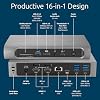
- Productive 16-in-1 Design - Ports include 2 x HDMI, 2 x DP, 1 x Thunderbolt host, 1 x USB-C 3.2 Gen2 10Gbps, 3 x USB-A 3.2 Gen2 10Gbps, 2 x USB-A 3.2 Gen1 5Gbps, 1 x USB-A 2.0 480Mbps, 1 x combo audio jack, 2 x SD or Micro Card readers, and 1 x 2.5Gbps Ethernet
- Built-in SD and Micro SD Card Readers - Perfect for graphic designers, video editors, and animators requiring fast and efficient data transfer speeds, the SD5800T transfers files at ultra-fast speeds via built in UHS-II SD and Micro SD card readers
- Zero-Footprint Mounting Option and Security Cable Lock Slots - Maximize desktop space by mounting your docking station out of the way. Mounting bracket sold separately (K34050WW). Protect your investment with a Kensington cable lock (K65020WW or K60603WW), sold separately
| Hardware Interface | USB Type C |
| Compatible Devices | Laptops |
| Total Usb Ports | 7 |
| Number of Ports | 17 |
| Total Number of HDMI Ports | 2 |
| Wattage | 98 watts |
| Item Dimensions L x W x H | 7.68"L x 4.09"W x 1.42"H (19.5 x 10.4 x 3.6 cm) |
| Item Weight | 1.34 Pounds (610 grams) |
| Color | Gray |
| Brand | Kensington |
| Global Trade Identification Number | 00085896328568 |
| UPC | 085896328568 |
| Manufacturer | Kensington |
| Model Number | SD5800T |
| Mfr Part Number | K32856NA |
| Total USB Ports | 7 |
| Product Dimensions (L x W x H) | 7.68"L x 4.09"W x 1.42"H (19.5 x 10.4 x 3.6 cm) |
| Total HDMI Ports | 2 |
Who Should Buy?

-
Content Creators
Dual 4K display support helps graphic designers and video editors enhance their workspace for better productivity and creativity.
-
Office Professionals
Works seamlessly with Windows and Mac OS, making it ideal for remote workers needing reliable connectivity for presentations.
-
Tech Enthusiasts
Supports Thunderbolt 4, offering high-speed data transfer and charging capabilities for users with the latest devices.

-
Casual Users
Those who only need a simple connection for basic peripherals may find this advanced dock unnecessary and overkill.
-
Budget-Conscious Buyers
The premium pricing might be a turn-off for users looking for more economical docking solutions without extra features.
-
Limited Port Usage
Users who don’t require extensive connectivity options may not leverage the full capabilities of this docking station.
Product Description
Have any Query? Chat with us
Customer Questions & Answers
-
Question:
What are the key features of the Kensington SD5000T5 Thunderbolt 5 Docking Station?
Answer: The Kensington SD5000T5 Docking Station offers dual display capabilities for MacBooks and triple display support for Windows systems. It includes multiple ports such as Thunderbolt 5, USB-C, HDMI, and DisplayPort, allowing users to connect a variety of peripherals and displays. This makes it an ideal choice for professionals who need to enhance their productivity by working on multiple monitors simultaneously. For example, graphic designers can utilize the dual or triple display setup to manage their design tools alongside reference materials. -
Question:
Is the Kensington SD5000T5 compatible with older Thunderbolt versions?
Answer: Yes, the Kensington SD5000T5 is compatible with previous Thunderbolt versions, specifically Thunderbolt 4. This backward compatibility ensures that users with earlier Thunderbolt-equipped devices can still utilize the docking station effectively. This feature is particularly beneficial for users planning gradual upgrades to newer hardware, as they can still leverage their existing investments in tech peripherals without needing to replace everything at once. -
Question:
How does the Kensington SD5000T5 improve productivity for remote workers?
Answer: The Kensington SD5000T5 significantly enhances productivity for remote workers by providing multiple connection options that facilitate a more organized workspace. With the ability to connect multiple monitors, along with various peripherals like external hard drives and webcams, remote workers can streamline their tasks, engage in video calls, and manage different applications efficiently. For instance, a remote employee could have video conferencing on one screen while working on project documents on another, creating a seamless workflow. -
Question:
What type of power delivery does the Kensington SD5000T5 support?
Answer: The Kensington SD5000T5 supports power delivery of up to 100W, which means it can charge connected devices while simultaneously allowing them to operate. This feature eliminates the need for multiple power adapters and helps keep the workspace tidy. For MacBook users, this translates to seamlessly using their laptop while keeping it charged, enhancing mobility and reducing downtime during critical tasks. -
Question:
Is the Kensington SD5000T5 suitable for gaming on Windows machines?
Answer: The Kensington SD5000T5 is compatible with Windows systems and is adequately equipped for light to moderate gaming scenarios. Its triple display support allows gamers to expand their experience across multiple screens. However, users should ensure their Windows machine's graphics card can support the desired gaming performance. Gamers can utilize one screen for gameplay while keeping communication or streaming applications accessible on additional displays. -
Question:
What operating systems are compatible with the Kensington SD5000T5?
Answer: The Kensington SD5000T5 is compatible with both macOS for MacBooks (M1, M2, M3, M4 Pro, and Max) and Windows systems equipped with Thunderbolt 5 and 4. This broad compatibility makes it a versatile choice for users in mixed OS environments, such as offices or households with both Mac and Windows devices. Users can easily switch between devices, streamlining productivity whether they are working on a MacBook for creative tasks or a Windows laptop for business applications. -
Question:
Can I connect my USB devices to the Kensington SD5000T5?
Answer: Yes, the Kensington SD5000T5 features multiple USB ports, allowing you to connect various USB devices such as keyboards, mice, printers, and external storage. This versatility facilitates a streamlined workspace by eliminating the need for multiple cables and ports on your laptop. For example, users can connect a printer for document production while also hooking up a USB storage device for file transfers, enhancing overall productivity. -
Question:
What type of external displays can I connect to the Kensington SD5000T5?
Answer: The Kensington SD5000T5 allows you to connect external displays using various ports, including HDMI and DisplayPort, facilitating both dual and triple monitor setups depending on your operating system. This capability is particularly beneficial for creative professionals and data analysts, who can spread their workflow across several monitors. For instance, a video editor might use one display for the editing timeline and another for previewing the final output. -
Question:
How does the Kensington SD5000T5 enhance video quality?
Answer: The Kensington SD5000T5 supports high video resolutions, enabling 4K output across multiple monitors. This capability allows users to experience clearer, more vibrant visuals essential for creative and professional tasks. Whether used for graphic design, video editing, or detailed spreadsheets, the high-quality video rendering ensures that users can see every detail without compromise, improving overall work quality and satisfaction. -
Question:
Where can I buy the Kensington SD5000T5 Thunderbolt 5 Docking Station?
Answer: You can purchase the Kensington SD5000T5 Thunderbolt 5 Docking Station on Ubuy in Madagascar. Ubuy offers a convenient platform for acquiring a range of tech products, ensuring that you can find this docking station alongside other essential accessories you might need. Shopping through Ubuy also provides access to various options and convenient purchasing processes tailored to meet your needs.
Kensington Docking Stations SD5800T Editorial Review


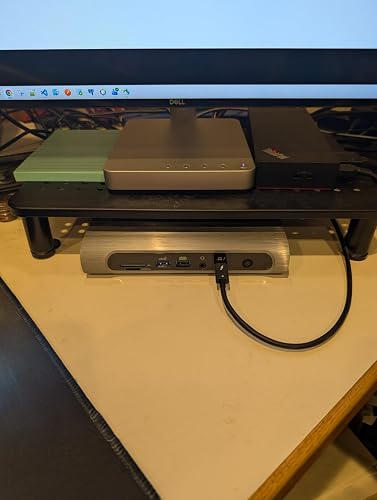
The Kensington SD5700T Thunderbolt 4 Docking Station has received a mixed reception from customers, with notable praise for its power delivery capabilities and build quality, while criticism primarily centers around the performance of its USB A ports and connectivity issues with external displays. Many users appreciate the dock's ability to supply power effectively, boasting a total output of 90W for device charging and another 90W for its own operation. The aluminum body is commended for durability and efficient heat dissipation, which contributes to a neat appearance on the workspace. Compatibility with various devices, especially when utilizing the Thunderbolt ports instead of USB A, has been a positive aspect; many users reported smooth operation when connecting high-powered devices. However, significant issues have been encountered regarding the USB A ports, with several customers noting instability and performance problems—particularly with external SSDs, which exceed the port's power capacity. These issues resulted in disconnections and slow speeds, leading some users to recommend avoiding high-power devices on the USB A ports altogether. Furthermore, connectivity problems have been reported when waking the computer from sleep mode, particularly by Mac users who found themselves having to repeatedly cycle the dock's power to regain connectivity with their monitors. This has led to Considerable frustration, compounded by reports of unresponsive customer support from Kensington, which has resulted in feelings of being stuck with a product that does not meet expectations. Overall, while the SD5700T Docking Station offers solid performance for many applications, users are cautioned about its limitations, particularly concerning its USB A ports and dependence on customer support for resolution of issues. **
Customer Reviews & Ratings
80 customers ratings
-
5 Star
56%
-
4 Star
18%
-
3 Star
6%
-
2 Star
6%
-
1 Star
14%
Review this product
Share your thoughts with other customers
Pros
- Good power delivery with 90W for devices and 90W for itself
- Durable aluminum build with effective heat dissipation
- Successfully supports dual 4K monitors via Thunderbolt
- Compatible with a variety of devices when using Thunderbolt ports
Cons
- USB A ports are unstable and not suitable for high-power devices
Related Categories
Related Brands
Product Price History
Important information
- Limitations : For products shipped internationally, please note that any manufacturer warranty may not be valid; manufacturer service options may not be available; product manuals, instructions, and safety warnings may not be in destination country languages; the products (and accompanying materials) may not be designed in accordance with destination country standards, specifications, and labeling requirements; and the products may not conform to destination country voltage and other electrical standards (requiring use of an adapter or converter if appropriate). The recipient is responsible for assuring that the product can be lawfully imported to the destination country. When ordering from Ubuy or its affiliates, the recipient is the importer of record and must comply with all laws and regulations of the destination country.
- Not all the products listed on Ubuy are for sale, as Ubuy is a global search engine. Products are subject to export/trade regulations.
MGA 1152586
Order now and get it around Wednesday, June 24
This item is not restrict in my country.(Please click on above link if this item is not restrict in your country, So our team will review and allow.)
QTY:
Secured transaction
Ubuy works hard to protect your security and privacy. Our advanced payment security system ensures confidentiality by encrypting your information during transmission using AES (Advanced Encryption Standards) and SSL (Secure Socket Layer) protocols. Your payment details are 100% secure as we do not share your payment details with third party sellers.
Our Top Logistics Partners
Fastest cross-border delivery
Features & Benefits
- Effortlessly transfer files and share peripherals between PCs, laptops, and tablets.
- Eliminates the hassle of plugging and unplugging devices.
- Supports single 8K or dual 4K displays for enhanced visual performance.
- Features a productive 13-in-1 design with ample connectivity options.
- Composed of 73% post-consumer recycled materials for sustainability.
- Offers up to 96W of Power Delivery for optimal performance.